
Value a Property Using Comparable Transactions
Estimate a property's market value by selecting comparable transactions, applying valuation adjustments, and generating a professional valuation report.
1. Select the Property
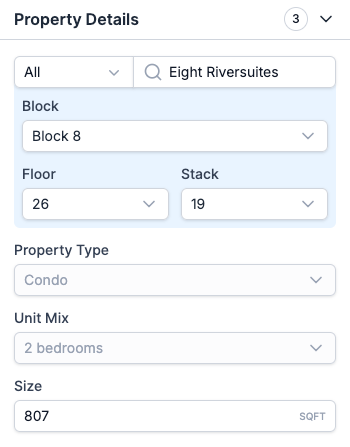
Search for the property you want to value.
Choose the:
- Project
- Building
- Stack
- Floor
Click Apply to retrieve the property's details and begin the valuation process.
2. Review Comparable Transactions
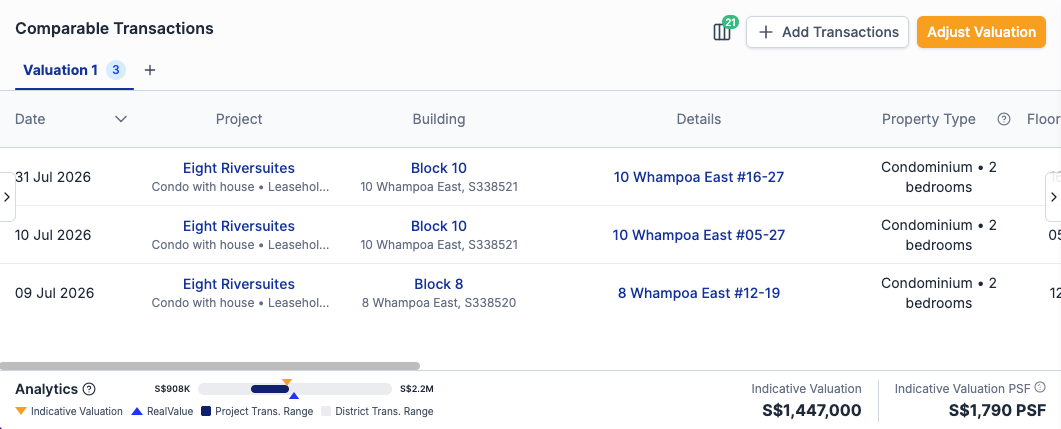
RealInsight automatically recommends comparable transactions based on the selected property.
These transactions serve as the foundation for your valuation. You can:
- Remove transactions that you don't consider comparable.
- Add additional transactions to better reflect your analysis.
This allows you to build a set of comparables that best represents the property's market value.
Tip: Select transactions that are most similar in terms of location, property characteristics, and transaction date to produce a more reliable valuation.
3. Adjust Comparable Transactions
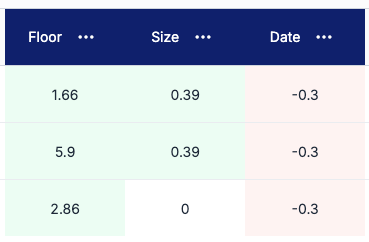
Click Adjust Valuation to review and refine each comparable transaction.
Because comparable properties are rarely identical, adjustments may be required to account for differences such as:
- Transaction date
- Floor level
- Floor area
- Other property characteristics
RealInsight automatically recommends adjustment values based on market data, but you can modify these recommendations to reflect your own professional judgement.
You can also add additional adjustments, such as property condition, to better account for differences that may influence value.
4. Review the Adjusted Valuation
Once all adjustments have been applied, RealInsight calculates the:
- Adjusted Price
- Adjusted Price per Square Foot (PSF)
These adjusted values represent the estimated market value of the selected property based on the final set of comparable transactions and adjustment assumptions.
Review the results to ensure the valuation reflects your analysis before generating the report.

5. Generate the Valuation Report
When you're satisfied with the valuation, generate a professional valuation report.
The report summarizes:
- Property details
- Selected comparable transactions
- Final estimated valuation