
Help Center > Find Businesses Registered in a Commercial Property
Find Businesses Registered in a Commercial Property
Identify the businesses registered at a commercial property and retrieve their UEN numbers for research, due diligence, or lead generation.
1. Select a Commercial Project
Search for and open the commercial project you want to explore.
Navigate to the project's Schematic view to see the building layout and individual properties.2. Select a Property
Click on any commercial property within the schematic.
The selected property opens its detailed property information.3. View Registered Businesses
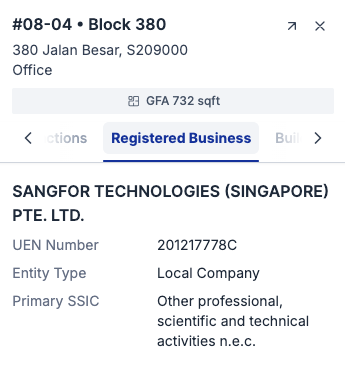
Within the property details, open the Registered Businesses section.
RealInsight displays the businesses currently registered at the selected property, including key company information.
Depending on the available data, you can view:
- Business name
- UEN (Unique Entity Number)
- Other available registration details
4. Use the Business Information
The registered business information can be used for:
- Company research
- Due diligence
- Tenant verification
- Lead generation
- Linking businesses with other available datasets